Tutorial 8 — Travel agent GUI walkthrough
This walkthrough is the visual companion to Tutorial 7. It shows the full travel-agent arc as an operator sees it in the NoETL GUI: the registered runtime, terminal-style prompt output, execution details, travel canvas, refinement forms, provider switching, and the validation checks that prove the playbook graph stayed under NoETL control.
The screenshots were captured from a local kind deployment after the
provider and widget rounds closed GREEN. The exact runtime in the
screenshots is automation/agents/travel/runtime version 26, with
Anthropic using claude-haiku-4-5-20251001.
What You Will Verify
By the end of the walkthrough you will have checked that:
- The travel runtime is discoverable in the catalog.
- The same travel playbook renders widgets in the prompt and the travel canvas.
- Flights, hotels, locations, activities, and help all route through one runtime.
- Amadeus is called through the
automation/agents/mcp/amadeusMCP playbook. - OpenAI and Anthropic run through the direct HTTP branch, while Vertex AI and Ollama run through NoETL MCP playbook hops.
app:formrefinement widgets emit prompt commands with substituted field values.- Execution details and audit rows prove which provider and render path actually ran.
1. Confirm the Runtime in the Catalog
Open the NoETL GUI and go to Catalog. Search for travel/runtime
if the list is long. The active catalog entry should show:
- Path:
automation/agents/travel/runtime - Active version
- Tasks count
- A description mentioning OpenAI, Anthropic, Vertex AI, Ollama,
Amadeus, and
result.render
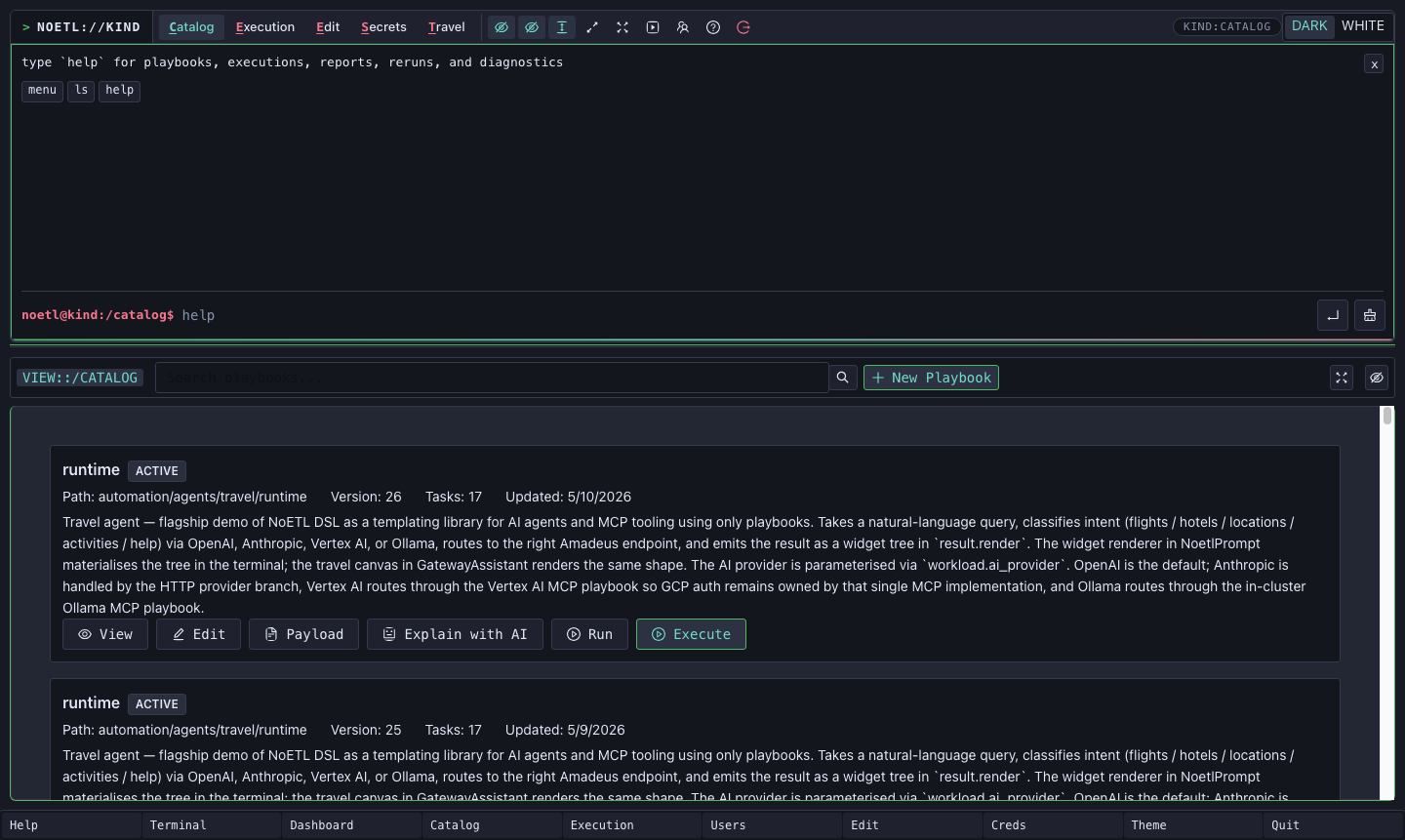
The catalog card is the first important proof point: the agent is not a separate application. It is a cataloged NoETL playbook. It can be run from the prompt, the travel canvas, API calls, or another playbook.
2. Run the Travel Command From the Prompt
Use the terminal-style prompt for direct operator work. The travel
verb sends the free-text query into the travel runtime:
noetl@kind:/catalog$ travel flights from SFO to JFK on 2026-07-15 for 2 adults
You can choose a classifier provider with --provider:
travel --provider openai flights from SFO to JFK on 2026-07-15
travel --provider anthropic locations near Boston
travel --provider vertex-ai help
travel --provider ollama activities near Times Square
When the execution completes, run report <execution-id> to render the
widget in the prompt output block:
report 623845109347385589
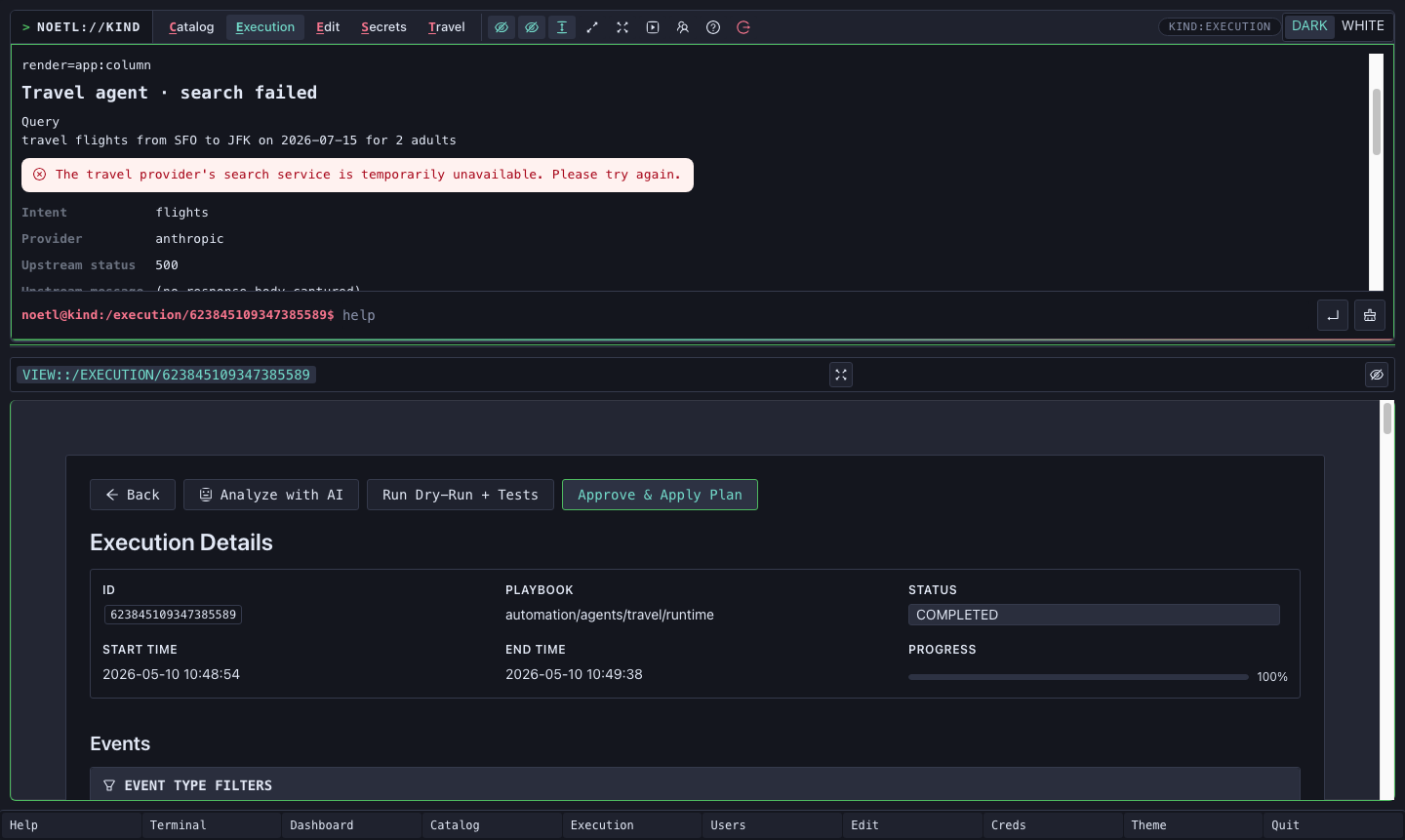
The screenshot shows the prompt rendering an app:column widget from
the execution. The visible fields prove that the classifier ran through
Anthropic (Provider anthropic) and that the Amadeus-backed branch
returned a friendly failure widget instead of failing the whole
execution when the upstream test API returned HTTP 500.
That distinction matters. NoETL sees the playbook execution as
COMPLETED; the widget describes the travel provider's temporary
failure as user-facing state.
3. Read the Execution Detail View
Open the execution detail page from the prompt output or by navigating
to /execution/<execution-id>.
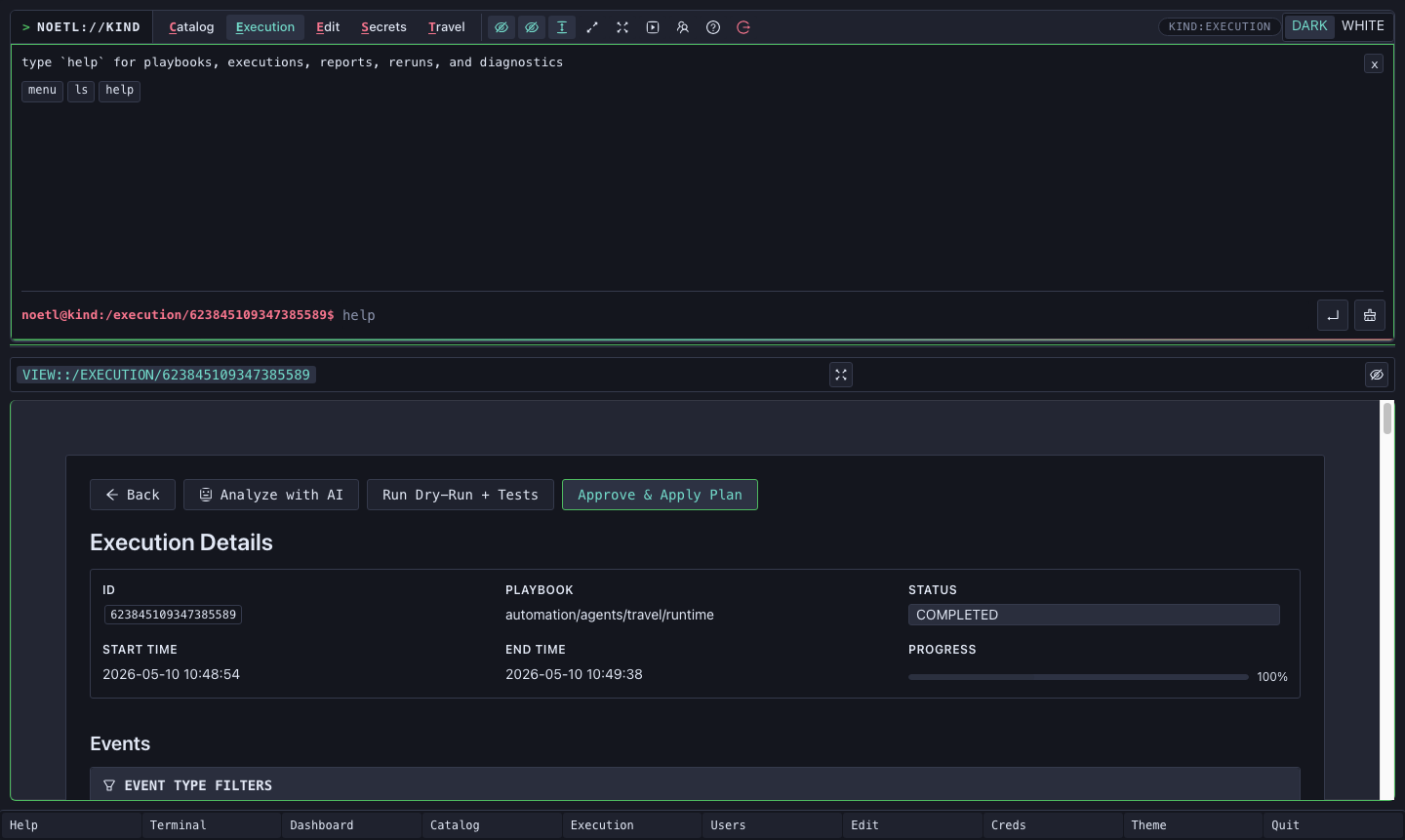
Use this page to verify:
- The playbook path is
automation/agents/travel/runtime. - The status is
COMPLETED. - Progress reaches
100%. - Events include the classifier step, Amadeus MCP step, and render tail.
For the screenshot run, the render tail was
render_amadeus_failure. In happy-path runs it can be
render_flights, render_hotels, render_locations, or
render_activities. The design rule is the same in every case:
the render-emitting step is the workflow tail so
execution.result.render remains the top-level result consumed by the
GUI.
4. Use the Travel Canvas
The Travel tab is a richer surface over the same runtime. It is not
a separate agent. It posts the request to
automation/agents/travel/runtime and renders the same widget tree that
the prompt renders.
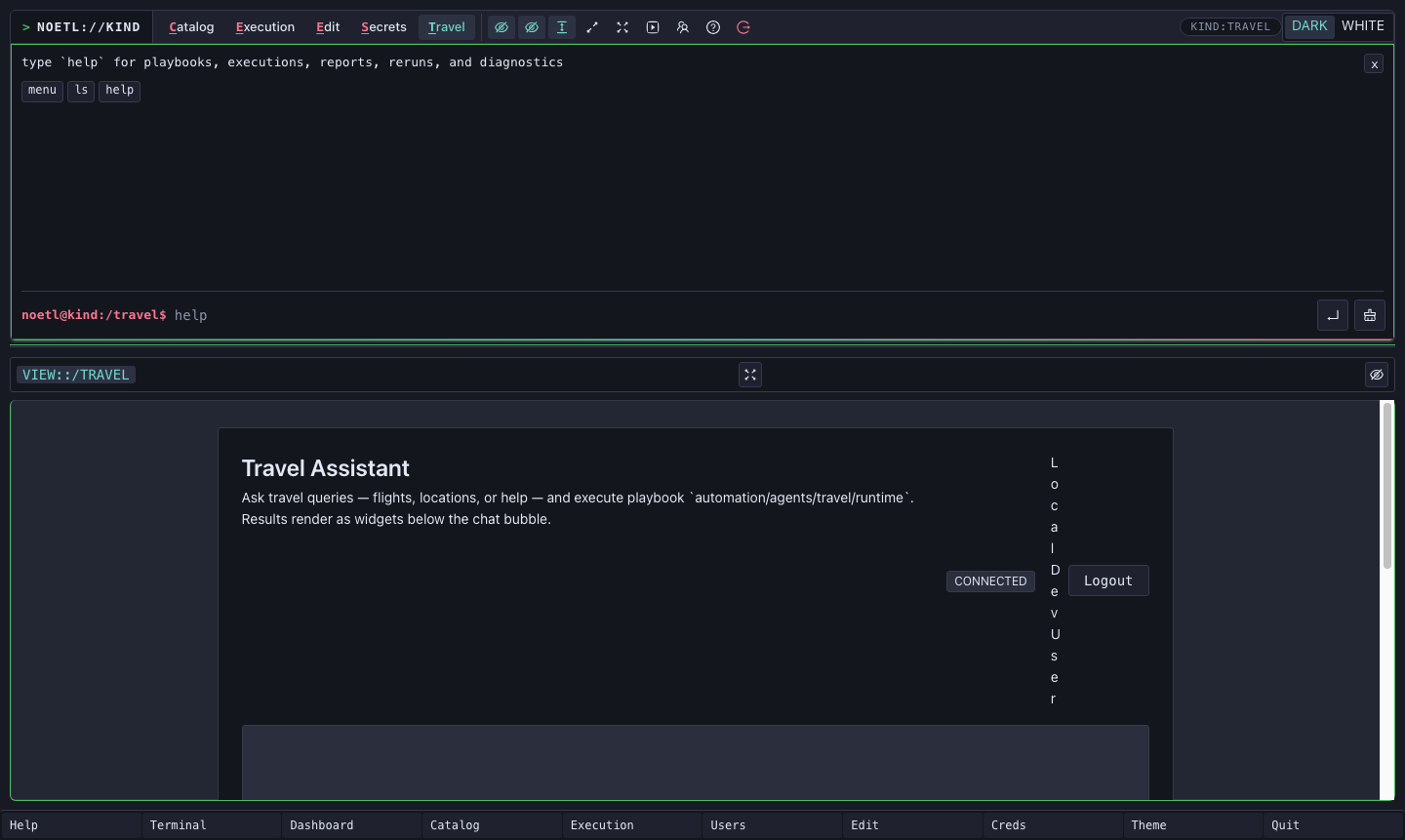
Type a request such as:
flights from SFO to JFK on 2026-07-15 for 2 adults
The canvas shows the request, polls the execution, and renders the widget below the output area when the playbook completes.
5. Refine a Search With app:form
Every Amadeus-backed render branch appends an app:form so the
operator can refine the search without retyping the whole request.
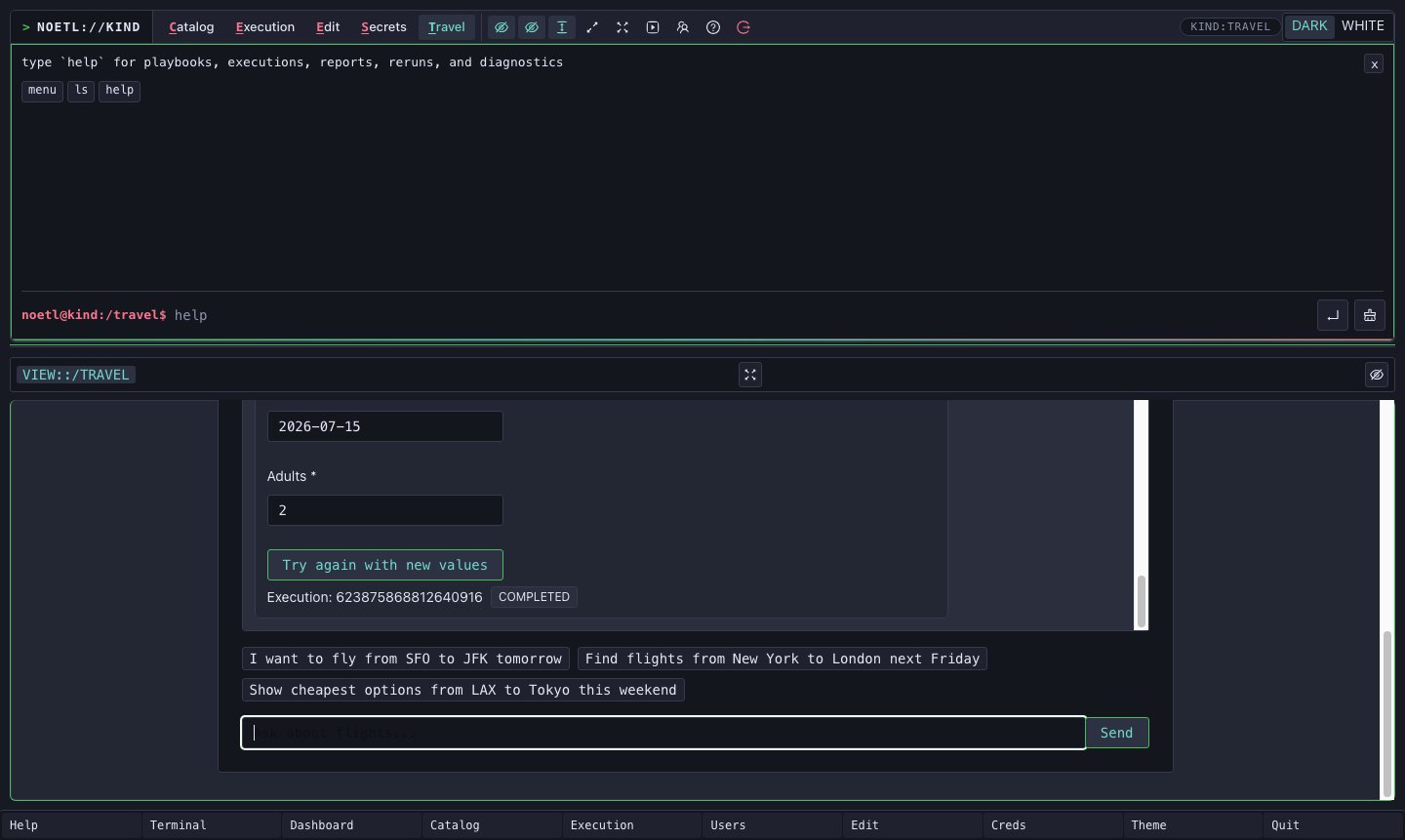
For flights, the form carries:
origindestinationdepartureDateadults
The button event contains a command template:
travel flights from {origin} to {destination} on {departureDate} for {adults} adults
When you change a field and click Try again with new values,
AppForm substitutes the current field values and emits a normal
widget event:
{
  "key": "command",
  "value": "travel flights from SFO to LAX on 2026-07-15 for 2 adults"
}
The prompt and canvas both route key: "command" into the same command
runner. That keeps widget interactivity inside the NoETL action surface
instead of bypassing the runtime with uncontrolled scripts.
6. Provider Matrix
The travel runtime now has four classifier paths:
| Provider | Path | Why |
|---|---|---|
| OpenAI | Direct Python urllib call | Simple bearer-token HTTP request. |
| Anthropic | Direct Python urllib call | Simple API-key HTTP request; current working model is claude-haiku-4-5-20251001. |
| Vertex AI | tool: agent, framework: noetl, entrypoint automation/agents/mcp/vertex-ai | GCP auth stays owned by the Vertex MCP playbook. |
| Ollama | tool: agent, framework: noetl, entrypoint automation/agents/mcp/ollama | The MCP playbook wraps the in-cluster Ollama bridge. |
The direct HTTP provider models are workload fields too:
openai_model defaults to gpt-4o-mini, and anthropic_model
defaults to claude-haiku-4-5-20251001. Callers can override either
field for a single run without forking the runtime.
All four paths merge into the same classify_intent contract:
intent
origin
destination
departureDate
adults
city
cityCode
keyword
latitude
longitude
effective_provider
provider_fallback_reason
The rendered widget shows the actual effective_provider, not merely
the requested provider. That is how a fallback remains visible without
turning a handled provider problem into an execution failure.
7. Intent Matrix
The runtime handles five intents:
| Intent | Downstream tool | Typical render |
|---|---|---|
help | No Amadeus call | Help widget with example command buttons. |
flights | automation/agents/mcp/amadeus → search_flights | Flight carousel or friendly failure widget. |
hotels | automation/agents/mcp/amadeus → search_hotels | Hotel record table or friendly failure widget. |
locations | automation/agents/mcp/amadeus → search_locations | Location record table or friendly failure widget. |
activities | automation/agents/mcp/amadeus → search_activities | Activity record table or friendly failure widget. |
The Amadeus calls run through a NoETL MCP playbook hop. This is the
core architecture rule from the flagship arc: MCP is just a playbook
with exposes_as_mcp: true. The same Amadeus implementation serves
external MCP clients and the travel agent.
8. Audit and Validation Checks
The render steps write audit rows as best-effort side effects inside
the render Python step. They do not use trailing kind: postgres
steps, because a trailing step would become the final result and
overwrite execution.result.render.
Useful audit query:
select
  execution_id,
  event_type,
  ai_provider,
  intent,
  payload->>'provider_fallback_reason' as fallback
from travel_agent_events
where execution_id = '<execution-id>'
order by event_time;
For a successful Anthropic smoke, the classifier row and render audit row should show:
ai_provider = anthropic
fallback    = null
For local-kind Vertex AI without GKE Workload Identity, the run may
complete with effective_provider=openai and a fallback reason. On GKE,
where Workload Identity is configured, the same --provider vertex-ai
path should show effective_provider=vertex-ai.
9. What We Learned
The GUI walkthrough is the visible end of several playbook authoring rules:
- Keychain workload fields use bare references such as
{{ gcp_auth }}, not{{ workload.gcp_auth }}. - Environment-specific workload defaults must match the deployment where the playbook runs.
- Provider branching belongs in normal workflow steps, not keychain
when:predicates. - Render-emitting steps should be workflow tails.
- Semantic failure state should use fields like
outcome, notstatus: failed. - Third-party 5xx responses should become friendly result envelopes until the HTTP tool can preserve error bodies natively.
- JSON destined for SQL should be serialized in Python first, then referenced as a single safe string in SQL.
- Widget clicks must stop DOM propagation and emit NoETL prompt commands, not native form submits or page navigation.
- Python helper functions that call other helpers may need
globals().update(...)in NoETL's separate globals/locals execution model. - Shared classifier prompts should live in one workload field and be referenced by each provider branch.
The long-form version of those rules lives in the Playbook authoring guide.