Tutorial 8 — Trip planner end-to-end
This capstone tutorial walks through the Adiona/muno trip-planner reference app. It connects the pieces built across the trip-planner rounds: the Muno React UI, the NoETL itinerary-planner playbook, Firestore event sourcing, Duffel test-environment flights and orders, Google Places enrichment, Amadeus hotels, and the Material widget renderer.
Everything in this tutorial is test environment only. Duffel orders use Duffel's test wallet and synthetic offers. Amadeus calls use the test API unless explicitly overridden elsewhere. The goal is to show the architecture and developer workflow, not to sell or ticket real travel.
Vision
Muno is a chat-first trip-planner shell. A traveler can type free-form requests, submit structured widgets, and gradually build an itinerary. The frontend stays thin: it validates and renders widget envelopes, shows trip state, and forwards user turns. The NoETL itinerary agent does the orchestration work by appending events, dispatching MCP tools, and choosing the next widget to emit.
The important design point is that every integration is a playbook boundary. Muno does not know how to call Duffel, Google Places, Amadeus, or Firestore directly. It renders widget JSON and lets NoETL preserve the audit trail.
| Round | Deliverable | Proof |
|---|---|---|
| 1 | Duffel test order tools | create_order execution 625452830463099795 created booking ref XKQAYC. |
| 2 | Duffel Stays decision | Stays was unavailable on the account, so hotels use Amadeus for v1. |
| 3 | Firestore MCP event sourcing | Firestore MCP v6 registered as catalog 625474366091821164; append_event seq smoke passed. |
| 4 | Itinerary agent | Muno PR #1 added playbooks/itinerary-planner.yaml and canonical widget examples. |
| 5 | Calendar view | Calendar smoke execution 625590045860168070 rendered calendar_view and wrote a Firestore event. |
| 6 | Muno UI + Material widgets | Muno PR #2 replaced JSON stubs with Material UI widgets and a theme. |
| 7 | This tutorial | Screenshots captured from the Muno UI and shipped into docs. |
Prerequisites
You need a GKE NoETL environment with the trip-planner MCP playbooks registered. The working project used:
- GCP project
noetl-demo-19700101. - GKE cluster
noetl-clusterinus-central1. - Worker service account
[email protected]with Workload Identity enabled. - Firestore Native mode database
(default)inus-central1. - MCP playbooks registered for
mcp/firestore,mcp/duffel,mcp/google-places, andmcp/amadeus. - Duffel test token in Secret Manager as
duffel-api-test. - Google Maps widget key in Secret Manager as
google-maps-widget-key. - Muno cloned locally with dependencies installed.
Credential examples in this tutorial intentionally use placeholders:
export VITE_GOOGLE_MAPS_KEY="<restricted-widget-api-key>"
export VITE_NOETL_API_BASE_URL="http://localhost:8082/api"
For the Google Maps setup model, see the Pattern C reference in ai-meta:
playbooks/google-maps-platform-setup-pattern-c.md.
For the lower-level travel-agent architecture that came before Muno, start with Tutorial 7 — Travel agent with widgets and the visual companion, Tutorial 8 — Travel agent GUI walkthrough.
Walkthrough
The screenshots below were captured from a clean local Muno dev session pointed at the GKE NoETL service through a port-forward:
kubectl -n noetl port-forward svc/noetl 8082:8082

cd /Volumes/X10/projects/noetl/ai-meta/repos/travel
VITE_NOETL_API_BASE_URL=http://localhost:8082/api \
VITE_GOOGLE_MAPS_KEY="<restricted-widget-api-key>" \
npm run dev -- --host 127.0.0.1 --port 5173
Open http://127.0.0.1:5173/.
1. Starting the chat
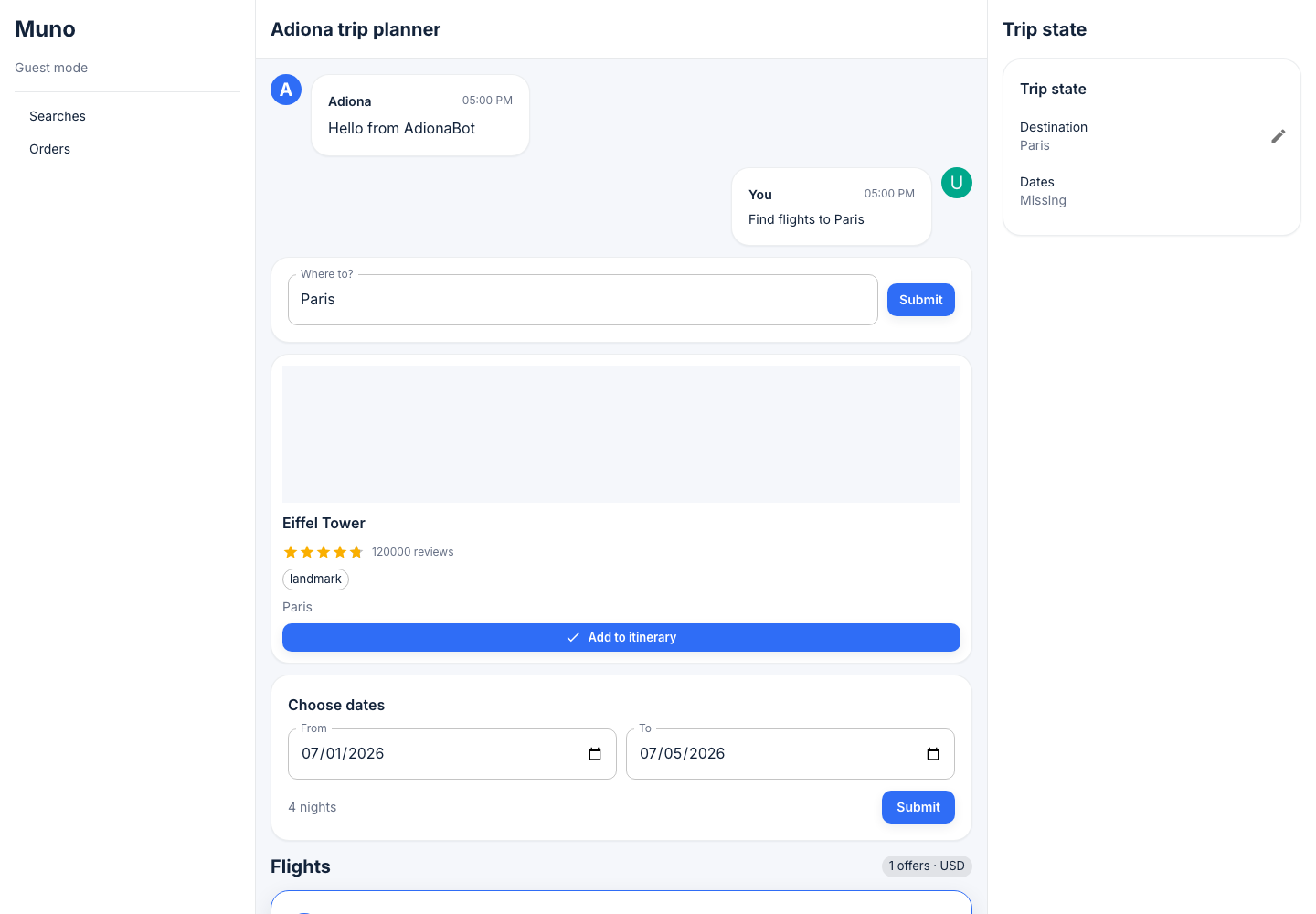
The initial Muno shell has three working areas:
- In local demo mode, the left rail can show guest mode and navigation for searches and orders. The production site shows a sign-in pane first.
- The center thread holds the assistant turns and widgets.
- The right pane mirrors current trip state, including destination, dates, party, budget, star rating, bed type, and amenities as those slots become known.
The traveler starts with a simple free-form request: "Find flights to Paris." In the live agent, that user message is appended to Firestore and passed into the extraction step. The UI can also emit structured widget submissions later in the same thread.
2. Free-form chat to place card
The extraction step converts the user's free-form text into slot updates
and tool requests. For a destination phrase such as "Paris", the agent
can dispatch Google Places through mcp/google-places.search_text.
The widget renderer then shows a place card. In the captured demo, the card is the Eiffel Tower with rating metadata, a landmark tag, and an Add to itinerary action.
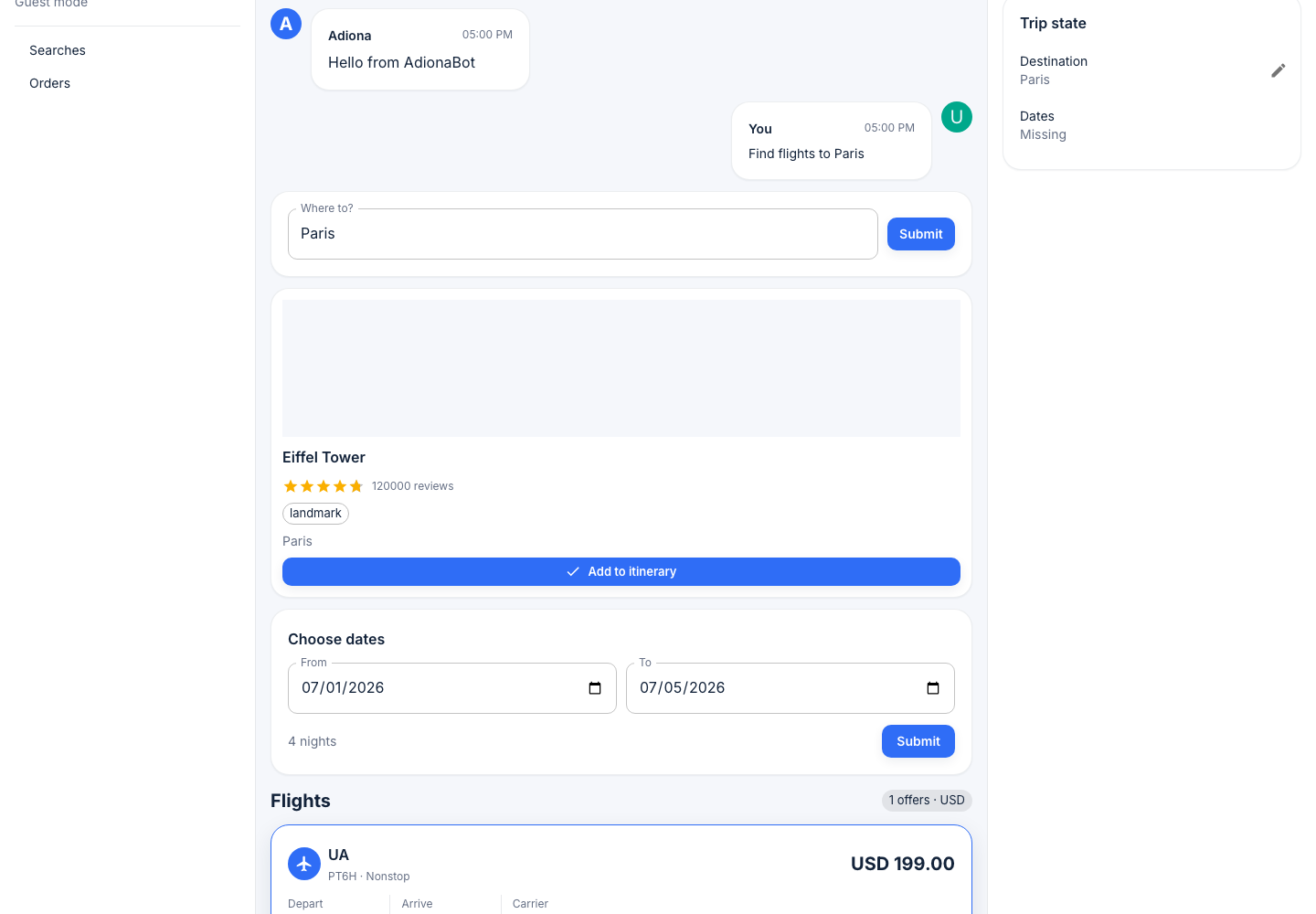
The Google Places enrichment round validated Pattern C auth on GKE:
backend calls used Workload Identity OAuth, while widget image URLs used
the restricted widget key. Direct Google Places MCP execution
625307783436435727 returned Eiffel Tower data. The round remained
AMBER only where Amadeus test API 500s blocked unrelated hotels and
locations paths.
3. Date-range picker
Once the agent knows the destination, it asks for dates with a
date_range_picker widget. A widget submit becomes another user turn:
the frontend emits the selected values, and the agent applies
check_in_date and check_out_date slot updates.
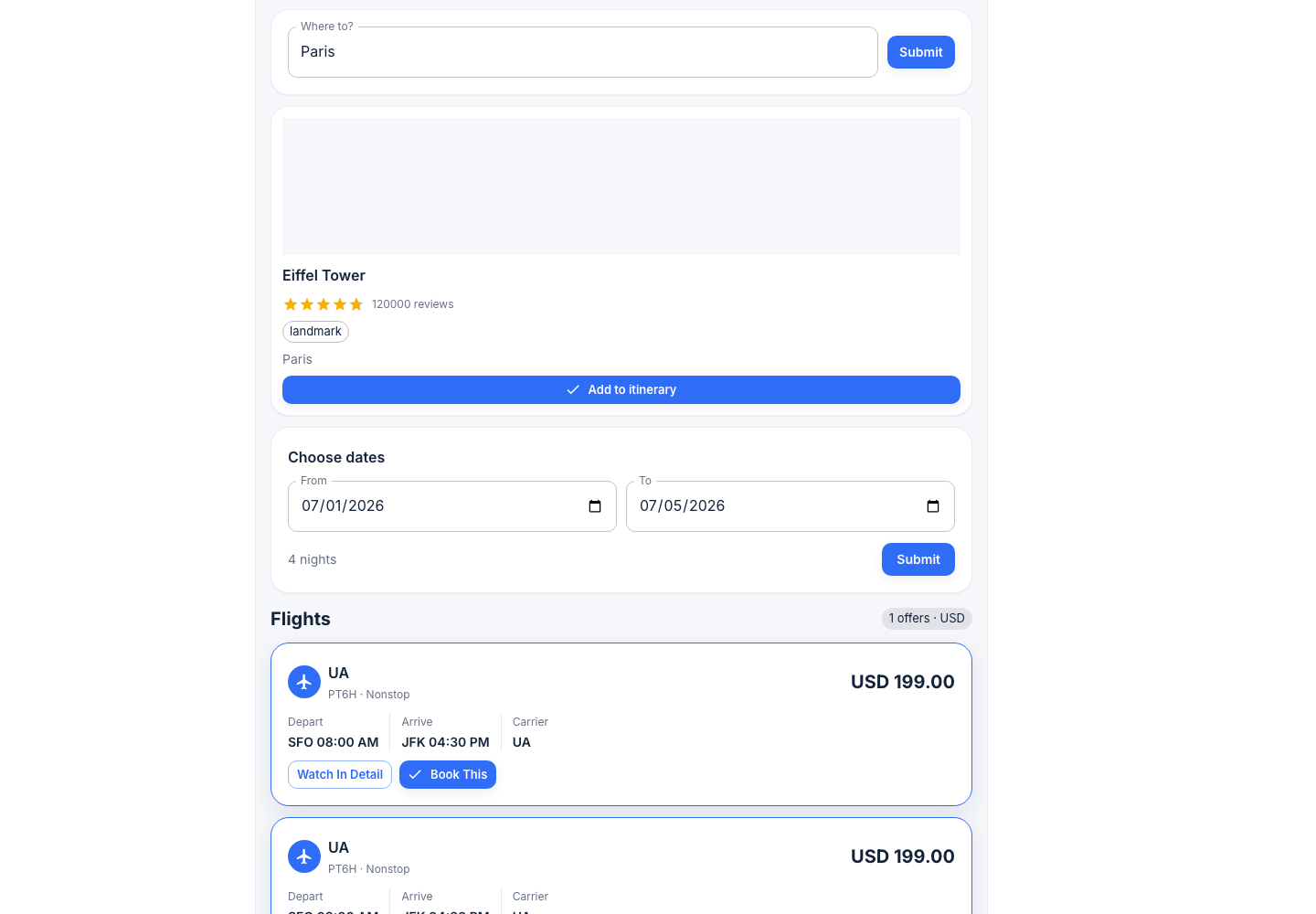
In v1, this is still a developer demo path. The widget contract is the important part: the browser does not mutate hidden agent state. It emits an event, NoETL records it, and the next agent turn decides what to do.
4. Flight search
Flights use Duffel by default. The search-only Duffel MCP round added
automation/agents/mcp/duffel and changed the travel runtime default to
flight_provider: duffel, while preserving Amadeus as an opt-out.
The default Duffel travel smoke was execution 625385246619337115. It
rendered 10 Duffel offers with effective_flight_provider=duffel. The
direct Duffel search_offers smoke 625385503302353446 also returned
10 capped offers.
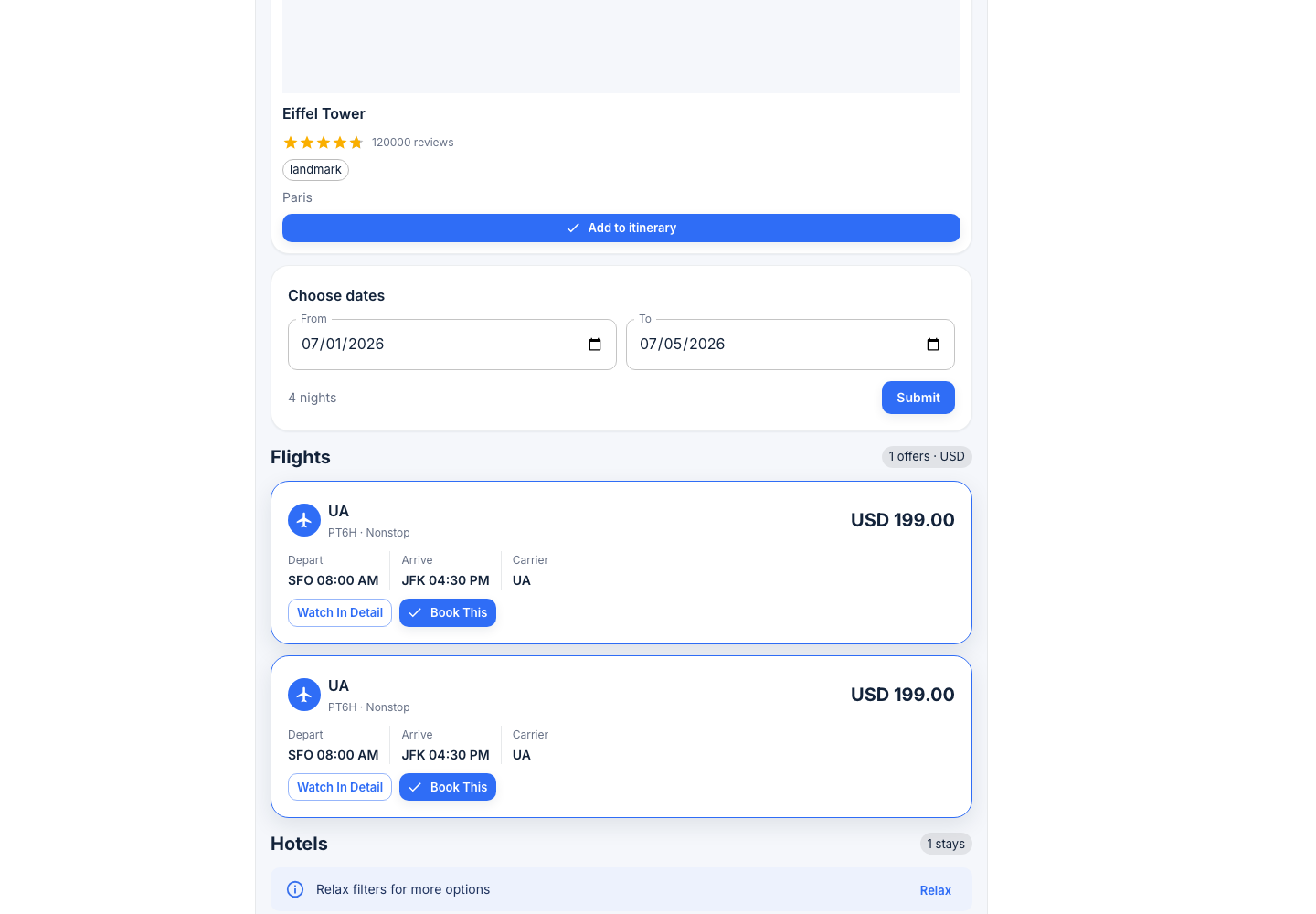
The compact flight cards expose two actions:
- Watch In Detail opens or renders a fuller offer view.
- Book This advances to the test-order path.
5. Book a flight in the test environment
When the traveler clicks Book This, the agent can call
mcp/duffel.create_order with a synthetic passenger and wallet-balance
payment. This is still Duffel test mode: no real money, no real
ticketing, and no production token.
The order-tools round validated this with execution 625452830463099795,
which created test booking reference XKQAYC and order id
ord_0000B6EeISs9tYodkIZlhY. The UI screenshot below shows the v1
confirmation widget shape.
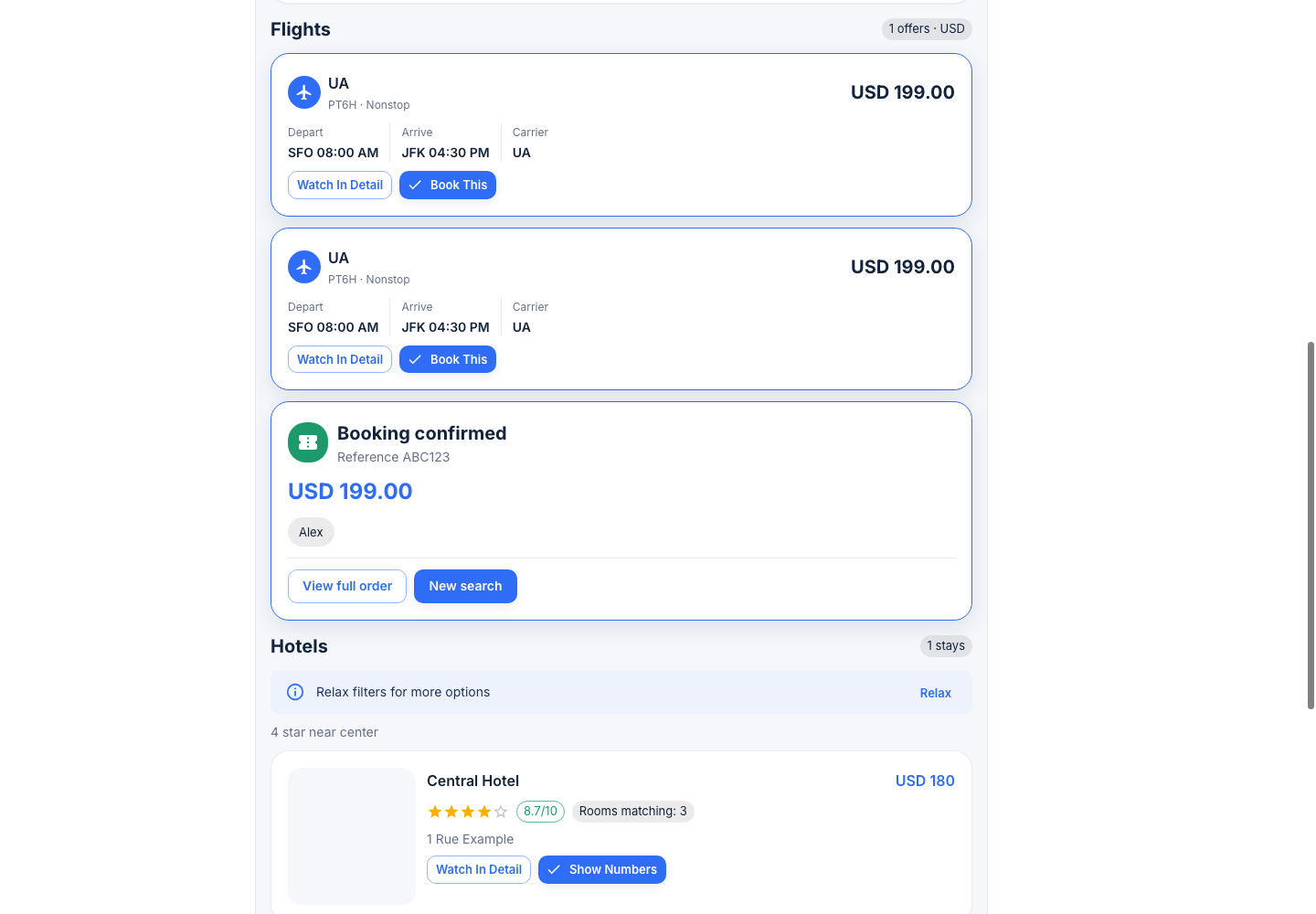
The displayed ABC123 reference is a synthetic placeholder in this
captured widget. The real Duffel test reference is stored in the event
and order audit path. Surfacing the exact provider booking reference in
the order_confirmation card is one of the v1 polish items listed
below.
6. Hotel search through Amadeus
Hotels use Amadeus in v1 because Duffel Stays was not enabled for the
test account. The agent dispatches mcp/amadeus.search_hotels and
renders hotel_list / hotel_card widgets.
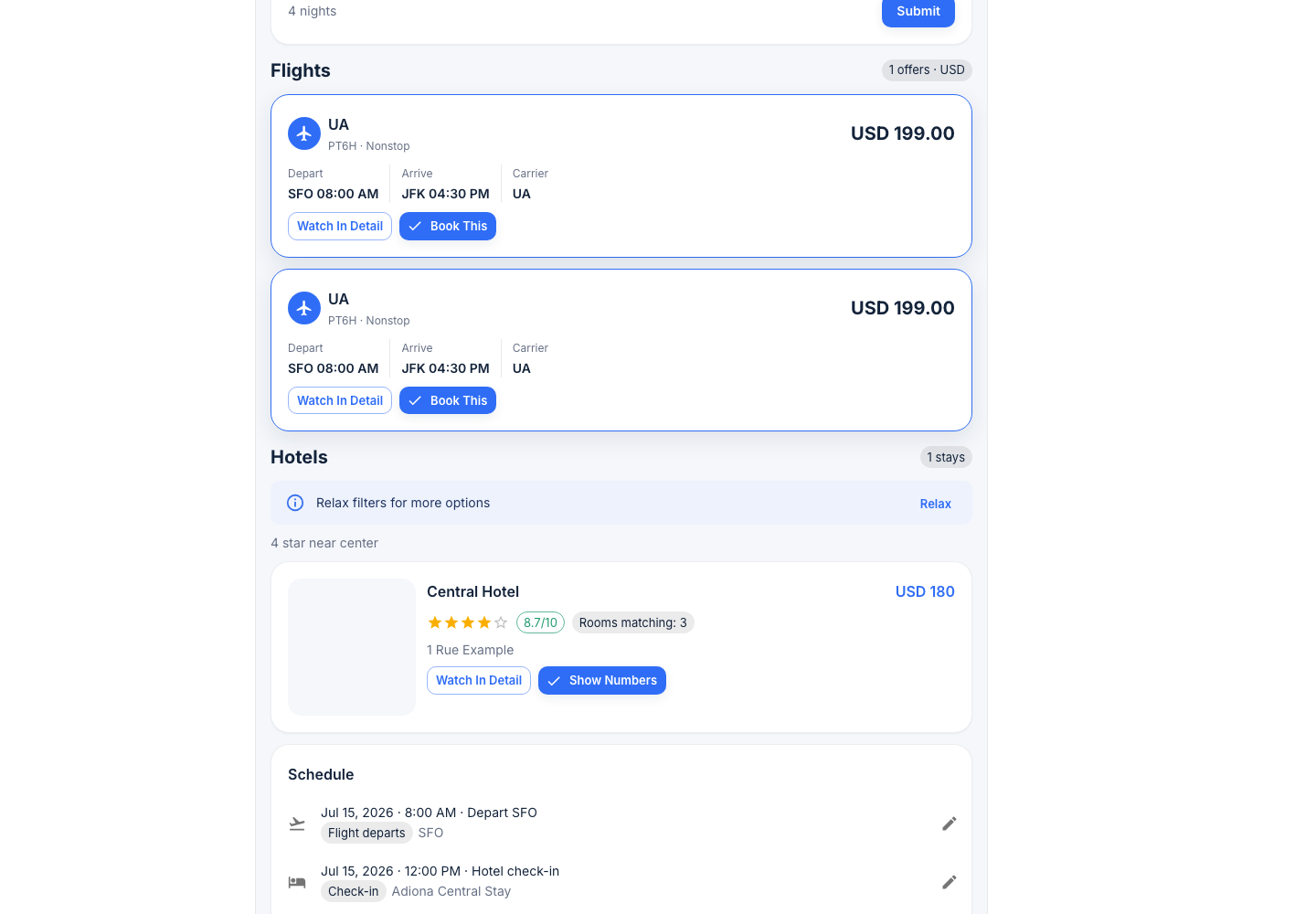
Amadeus test API reliability is tracked separately. The known friendly
failure path is proven by execution 625309687340073612, where the
Amadeus test API returned HTTP 500 before Google enrichment could run.
That is not treated as a wiring regression: NoETL returns a handled
friendly widget instead of crashing the trip flow.
7. Schedule populates through Firestore
After a flight order and hotel choice, the itinerary agent writes
calendar event documents through mcp/firestore. The calendar_view
widget can render static event payloads or subscribe to a Firestore path
when Firebase web config is available.
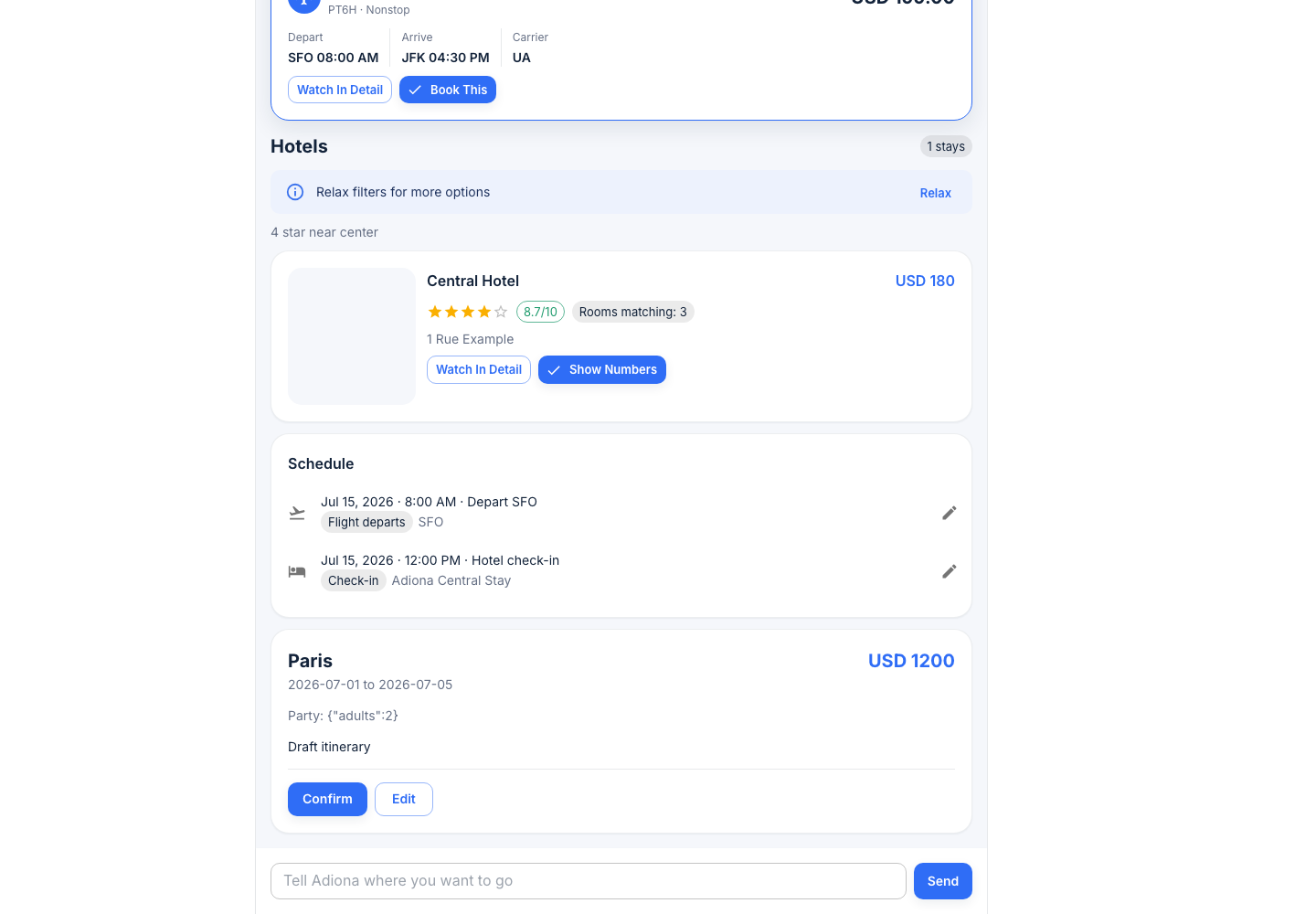
The Firestore MCP round registered automation/agents/mcp/firestore as
catalog 625474366091821164 and verified exactly six tools:
set_doc, get_doc, query_collection, delete_doc, append_event,
and replay_events. Its append_event smoke proved transactional
sequence assignment with [1, 2, 3, 4, 5] and mandatory header
redaction.
The calendar-view round then proved the Muno path end-to-end with
execution 625590045860168070. That execution rendered
calendar_view variant full and wrote a user_note event document
under chat_threads/_smoke-calendar-1778643344/trip/current/events/....
The smoke documents were deleted after validation.
8. Itinerary summary and confirm
The final review step is an itinerary_summary widget. It gathers the
destination, date range, selected travel items, rough cost, and
confirmation actions into one card. The chat input remains available at
the bottom, so the traveler can still say things like "add a 3pm museum
visit Wednesday" and let the agent append another event.
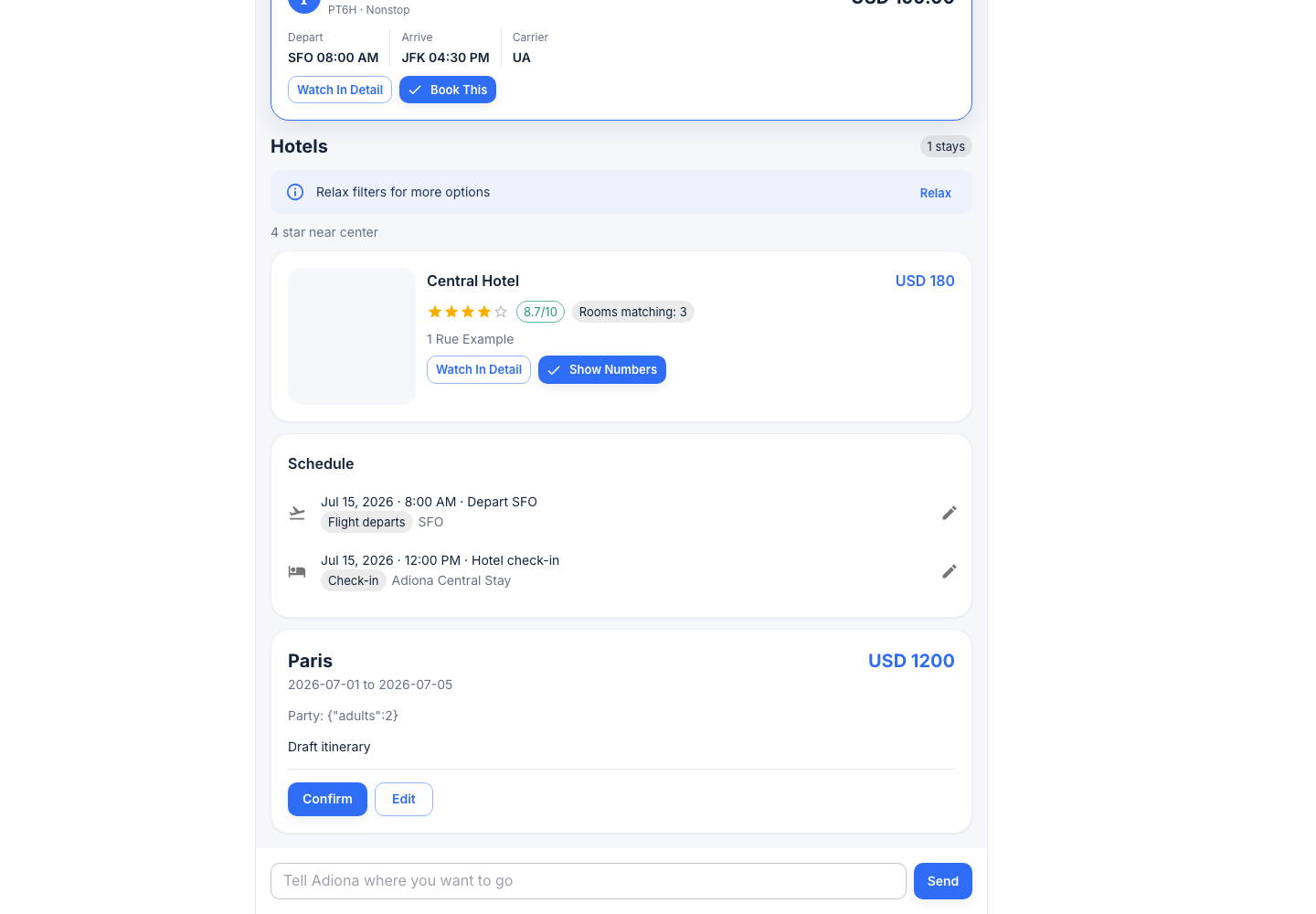
Confirming the itinerary should be another event-sourced turn rather than a hidden browser-side mutation. That keeps replay possible: the same thread can be inspected later to see exactly which user turn, widget submit, tool call, and widget emission produced the final state.
Behind the scenes: replay the session
The replay helper lives in ai-meta as an operator script:
cd /Volumes/X10/projects/noetl/ai-meta

scripts/firestore_replay.sh thread-list --limit 5
Once you know the thread path, inspect the first few events:
scripts/firestore_replay.sh events chat_threads/<thread-id> --from 1 --to 30
A healthy session reads like a structured trace:
{
  "events": [
    { "seq": 1, "type": "user_message", "text": "Find flights to Paris" },
    { "seq": 2, "type": "agent_slot_update", "slot_updates": { "region": "Paris" } },
    { "seq": 3, "type": "agent_tool_call", "tool": "google_places.search_text" },
    { "seq": 4, "type": "agent_tool_response", "status": "ok" },
    { "seq": 5, "type": "agent_widget_emit", "widget_type": "place_card" }
  ]
}
Full third-party request and response snapshots belong in
events/api_calls/ with sensitive headers redacted. The Firestore MCP
smoke explicitly verified that Authorization is stored as
<REDACTED> while harmless headers such as Accept remain visible.
Replay is deterministic for slot updates, tool sequence, and emitted widget types. Natural-language assistant text can drift across LLM providers and model versions, so the stable contract is the event log and widget envelope, not exact prose.
What is not covered in v1
The capstone is intentionally honest about the first pass:
- Real-money booking is not covered. Duffel live tokens, payment processor choice, KYC, refunds, and PCI scope are separate product and compliance threads. This tutorial uses Duffel test mode only.
- Mobile responsive polish is deferred. The current screenshots are desktop-first. Figma has mobile variants, but they are not the scope of this walkthrough.
- Per-user Firestore rules are not covered. Production playbook execution
is gated by Auth0 plus the NoETL gateway
session_token, but Firestore live reads still use the v1 permissive frontend rules. Per-uid Firestore tightening is a future auth-hardening round. - Google Calendar sync is intentionally absent. Calendar data is Firestore-only in this scope. No Google Calendar API and no ICS export are included.
- The captured dates are not fully consistent. The date picker shows
07/01/2026to07/05/2026, while the sample schedule showsJul 15, 2026. That is a demo-data polish issue, not a widget contract issue. - Filter-narrowing widgets are not yet agent-emitted. The contract includes filters, but v1 does not yet drive star-rating sliders, budget ranges, or amenities checkboxes as a complete refinement loop.
Try it yourself
Start from the docs and source repos:
cd /Volumes/X10/projects/noetl/ai-meta
git submodule update --init --recursive
Run the GKE port-forward:
kubectl -n noetl port-forward svc/noetl 8082:8082
Start Muno locally:
cd repos/travel
npm install

VITE_NOETL_API_BASE_URL=http://localhost:8082/api \
VITE_ALLOW_GUEST=true \
VITE_GOOGLE_MAPS_KEY="<restricted-widget-api-key>" \
npm run dev -- --host 127.0.0.1 --port 5173
Open:
http://127.0.0.1:5173/
For the production site, open:
https://travel.mestumre.dev/
The first screen is now a sign-in pane. Complete Auth0 sign-in with an allowed
account, then Muno links that Auth0 identity to the NoETL gateway session before
showing the chat shell. Local development can preserve the old guest-mode flow
with VITE_ALLOW_GUEST=true; production leaves that variable unset.
Then try a simple starting prompt:
Find flights to Paris for July 1 through July 5
Use the widget cards to pick dates, choose a flight, review hotels, and
confirm the itinerary. Then use scripts/firestore_replay.sh from
ai-meta to inspect the thread's event log.
Related
- Scoping doc:
sync/issues/2026-05-12-trip-planner-app-scoping.md - Pattern C Google Maps setup:
playbooks/google-maps-platform-setup-pattern-c.md - Duffel flights result:
bridge/outbox/20260512-130000-duffel-flights-mcp.result.json - Duffel test orders result:
bridge/outbox/20260512-220000-duffel-test-orders.result.json - Firestore MCP result:
bridge/outbox/20260512-235000-firestore-mcp-event-sourcing.result.json - Muno bootstrap result:
bridge/outbox/20260513-000000-muno-bootstrap-widget-contract.result.json - Itinerary agent result:
bridge/outbox/20260513-010000-itinerary-agent-4b.result.json - Material widgets result:
bridge/outbox/20260513-010500-muno-material-widgets-6b.result.json - Calendar view result:
bridge/outbox/20260513-020000-firestore-calendar-view.result.json - Muno repository:
noetl/travel - Figma exports:
/Volumes/X10/projects/adiona/figma/Adiona_material/